


Latest Version
ODESSYS TECH LTD
Communication
Mac
Free
6738347062
Report a Problem
More About Sends Messenger Desktop
The Challenge of Modern Communication—Solved on Your Desktop
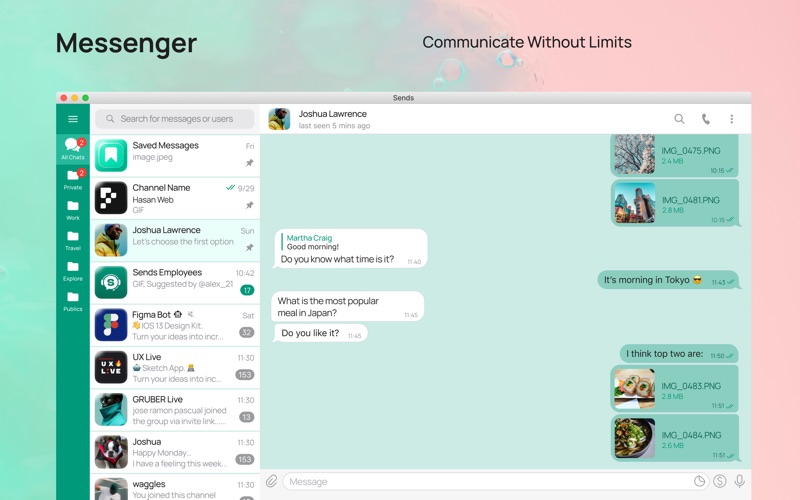
In an era where our digital workspaces are cluttered with endless browser tabs and disjointed communication channels, staying connected efficiently is a constant struggle. Switching between personal chats, professional groups, and heavy file-sharing platforms can disrupt your focus. The Sends Messenger Desktop communication app for Mac addresses this exact friction point, bringing a streamlined, high-performance messaging environment directly to your desktop.
Developed by ODESSYS TECH LTD, this dedicated client ensures that your conversations remain fluid, organized, and deeply integrated into your macOS environment without the overhead of a standard web browser.
Key Features of Sends Messenger Desktop
This desktop application is packed with robust features designed to make daily communication effortless:
- Rapid Message Delivery: Optimized engine architecture ensures your text, media, and documents are transmitted instantly across the globe.
- Robust Privacy and Security: End-to-end encryption keeps your personal discussions, sensitive work documents, and shared credentials completely secure from third-party interception.
- Multi-Device Cloud Synchronization: Switch from your phone to your Mac without losing your place. Your entire chat history, media files, and active channels sync securely via cloud-based storage.
- Heavy File Sharing: Share high-resolution photos, videos, and large project files without worrying about restrictive size limits.
- Advanced Collaboration Tools: Build communities using interactive groups and channels, or automate your daily workflows with integrated smart bots.
- Visual Personalization: Tailor the interface to match your workspace aesthetic with custom themes and wallpapers.
Who is This Desktop Messenger For?
The Sends Messenger Desktop communication app is highly suited for professionals who need to manage team communication without leaving their primary work device, as well as casual users who prefer the tactile feel of a physical keyboard over mobile typing. Because it runs natively on Mac, it provides a distraction-free space where you can monitor channels, manage files, and keep up with friends without constantly checking your phone.
An Optimized Desktop Experience
What sets this release apart from generic web wrappers is its focus on performance and native integration. By leveraging cloud-based storage, it keeps your local system storage lightweight while ensuring you never lose access to your media archives. The addition of automated bots allows power users to set up reminders, manage channel moderation, and streamline repetitive tasks directly from the chat interface.
Get Started on the Official App Store
If you are looking to elevate your desktop communication setup with speed, security, and cloud-backed reliability, this software is an excellent choice. To try it out and experience seamless cross-device chat firsthand, head over to the official Apple App Store to download the application for your Mac.
Rate the App
User Reviews








Popular Apps










Editor's Choice